

In this collaborative article, we spotlight the contributions of Anabela Carvalho and Bárbara Salgado, Senior QA Engineers at Blip, as they share their use case with Playwright Fixtures. We'll explore how this powerful feature helps streamline test setup and ensure consistency across different scenarios. Read on to learn about their experiences with the tool and to access a hands-on guide for effectively implementing Playwright Fixtures in your testing.
Introduction
Quality Assurance teams at Blip are constantly innovating to ensure the reliability and quality of our platforms, especially given the dynamic and unpredictable nature of the data we handle. Developing and maintaining reliable regression test suites is challenging, but the benefits far outweigh the effort. Our applications are continually evolving, and we must be creative in testing scenarios that reflect real-world situations. For example, in the sports betting industry, we often recreate complex scenarios like penalty shoot-outs in football, where each kick is either untaken, scored, or missed. While these events don't happen every match, we use mocked data to simulate them regularly, ensuring our system performs flawlessly. In this context, Playwright, a versatile browser automation framework, plays a crucial role in enhancing our test coverage.
Testing Dynamic Content with Playwright
Playwright is a versatile tool for automating browser interactions and tests across different browsers and devices. It’s an open-source framework that provides a straightforward API that simplifies scripting even for complex scenarios. Because of this, we think it’s an ideal choice for modern web development and testing environments.
Reliable Movie and Book Lists on a Library Platform
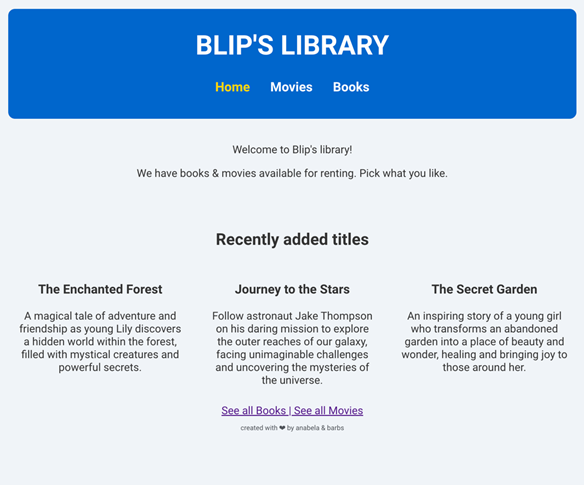
Let’s start with our test subject – a library website that provides lists of available movies and books. Our website is very simple: it features a landing homepage with a navigation bar containing three options: Home, Movies or Books.
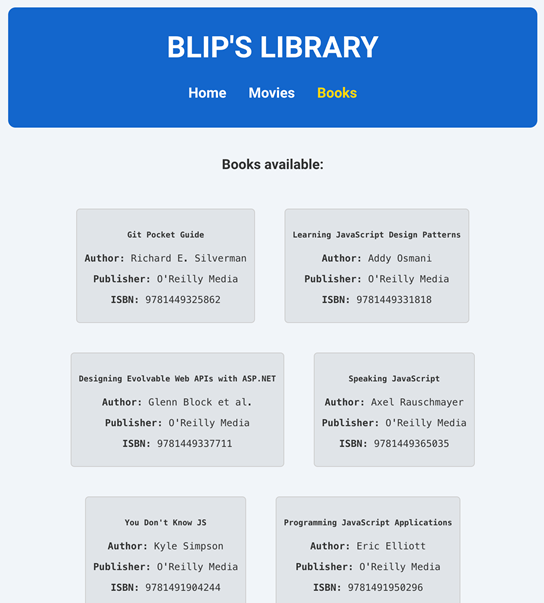
When the user visits one of the content pages, let’s say Books, either by clicking on the navbar item ‘Books’ or accessing /books, they will land on the Books page. Our website will then consult an API to retrieve whichever books are available and show them to the user.
Here’s an example request and example response for the API:
HTTP GET /api/books
{
    "books": [
      {
        "isbn": "1234",
        "title": "Book title",
        "author": "Author name",
        "publish_date": "2020-06-04T08:48:39.000Z",
        "publisher": "Publisher name",
      }
    ]
}
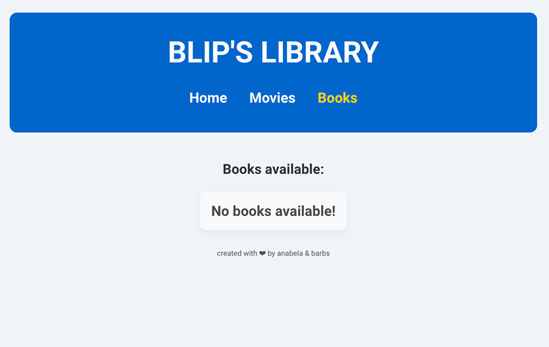
If by any chance there are no books available, the website will show a message indicating so.
And if we get an error while fetching the API, we then show another screen:
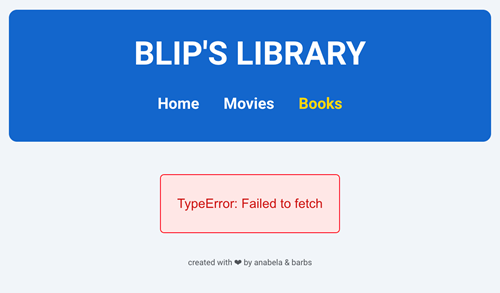
And that’s basically every screen we may encounter while navigating this website.
Test Pyramid Approach
For the test coverage of our Library we’ll follow the concept of the test pyramid which advocates for a balanced approach to automated testing by structuring tests into three levels:
- Unit Tests: At the base, these are fast, isolated tests that cover individual components or functions.
- Integration Tests: In the middle, these tests verify the interaction between integrated components or systems.
- End-to-End (E2E) Tests: At the top, these tests validate the entire application flow from start to finish, mimicking real user scenarios but are slower and more brittle.
The pyramid suggests having more unit tests, fewer integration tests, and even fewer E2E tests to ensure a robust, efficient testing strategy. For this experiment, we will only focus on E2E and, more importantly, integration tests – ensuring our website functions correctly by testing it independently from the API that supplies its data.
Test scenarios
- Scenario 1 - End-2-end test: visit books page
For this scenario we’ll access our Library website and navigate directly to the Books page as a real user would.
test('E2E – visit books page', async ({ page }) => {

	// navigating to our books website
	await page.goto('http://localhost:3000/books');

	// creating some constants to interact with page elements
	const header = page.getByTestId('header');
	const bookList = page.getByTestId('bookList');

	// asserting on the page's title
	await expect(header).toHaveText("Blip's Library");

	// asserting that there's a book list visible
	await expect(bookList).toBeVisible();
});
As you can see, we’re using Playwright’s <page.goto> to access our Books page url, then asserting on some static content from our books page.
- Scenario 2 – Integration test (mocked data): No books available
Now, if we want validate a scenario where the API returns no books, we can’t rely on end2end tests, as this is unlikely to happen frequently. We still need, however, to cover all our functional paths – and we do show a message for ‘no books available!’ as seen previously. We will use mocked data to generate this condition and guarantee our website functions as expected when this situation arises.
By using playwright’s <page.route>, we’re be able to intercept the API call to /api/books and modify it to our needs. As we know the contract of this API, we’re able to mock its response with an empty array.
test('there are no books available', async ({ page }) => {

  // before navigating to website, we're going to mock our API.
  // body will return an empty books array
  await page.route('http://localhost:3001/api/books', (route) => {
      route.fulfill({
      body: JSON.stringify({ "books": [] }),
    });
  });

  // now we can navigate to books page
  await page.goto('http://localhost:3000/books');

  // creating some constants to interact with elements
  const header = page.getByTestId('header');
  const bookList = page.getByTestId('bookList');
  const noBooksMessage = page.locator('.no-books')

  // asserting on the page's title
  await expect(header).toHaveText("Blip's Library");

  // assert on no books available message
  await expect(noBooksMessage).toHaveText('No books available!')

});
This way, we can guarantee that we will always get this scenario covered and can now add it with confidence to our regression test battery.
- Scenario 3 - Integration test (mocked data): 2 books available
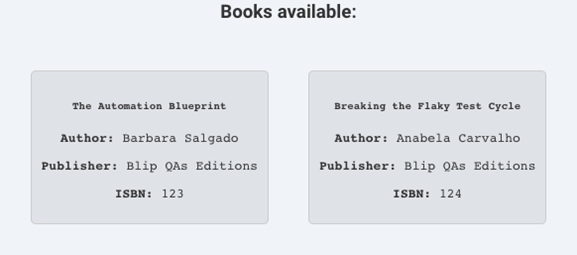
Now, since in our initial end-2-end test couldn’t validate the actual content of a book because the API response can’t be predicted, we will use mocked data to present two books and assert its contents.
As we did in the last scenario, using Playwright’s <page.route>, we’ll intercept the browser call to /api/books and modify it to our needs – we’ll create a valid response with two fake books.
test('there are 2 books available', async ({ page }) => {

  // before navigating to website, we're going to mock our API.
  // body will return two fake books

  await page.route('http://localhost:3001/api/books', (route) => {
    route.fulfill({
      body: JSON.stringify({
        "books": [{
          "isbn": "123",
          "title": "The Automation Blueprint",
          "subTitle": "Mastering QA in the Age of Continuous Delivery",
          "author": "Barbara Salgado",
          "publish_date": "2020-06-04T08:48:39.000Z",
          "publisher": "Blip QAs Editions",
          "description": "a book about automation in the QA world"
        },
        {
          "isbn": "124",
          "title": "Breaking the Flaky Test Cycle",
          "subTitle": "A Pragmatic Guide to Reliable Test Automation",
          "author": "Anabela Carvalho",
          "publish_date": "2020-06-04T08:48:39.000Z",
          "publisher": "Blip QAs Editions",
          "description": "a book about handling flaky tests"
        }]
      }),
    });
  });

  // now we can navigate to books page
  await page.goto('http://localhost:3000/books');

  // creating some constants to interact with page elements
  const bookList = page.getByTestId('bookList');

  // asserting book list is visible and taking a screenshot of its contents
  await expect(bookList).toBeVisible();
  await bookList.screenshot({ path: 'booklist-2-results.png' });
});
In this example we are even able to cover this functional path with visual tests, because we are making sure that the results are always the same. This is what our test would find while running:
- Scenario 4 - Integration test (mocked data): Error fetching API
For this scenario we will once again use Playwright’s <page.route> to intercept the browser’s API call to /api/books but this time we won’t care about the response, we just want a status code 500. This way we can prompt the website to react and adapt its visual content to this edge case.
test('there was an error fetching the API', async ({ page }) => {

  // before navigating to website, we're going to mock our API.
  // body will return an empty books array
  await page.route('http://localhost:3001/api/books', (route) => {
    route.fulfill({
      status: 500,
    });
  });

  // now we can navigate to books page
  await page.goto('http://localhost:3000/books');

  // creating some constants to interact with elements
  const header = page.getByTestId('header');
  const bookList = page.getByTestId('bookList');
  const errorMessage = page.locator('.error')

  // asserting on the page's title
  await expect(header).toHaveText("Blip's Library");

  // assert on no books available message
  await expect(errorMessage).toHaveText('Error fetching API!')

});

Creating Fixtures
In Playwright, fixtures are a powerful way to set up the environment or context for your tests, allowing you to share setup and teardown code across multiple tests. They help ensure that each test has the necessary context and resources, and they promote code reusability by allowing shared setup and teardown logic. Looking at our previous test examples, every single test has a common shared setup: every test will instanciate some elements and every test will open the same url. This shared setup is a good example where a Fixture can be useful. The purpose of this new Fixture will be the following:
- Load page objects associated with this page, so we can easily interact with elements in our tests.
- Open the respective page by doing a <page.goto> to the correct URL.
import { Page, test as base } from '@playwright/test';

import { BooksPO } from '../page-objects/books.po';

// our new type of fixtures is called PageFixtures
// for now we only have one Fixture, BooksPage
export type PageFixtures = {
  BooksPage: BooksPO;
};

// extending playwright's basic test by providing a BooksPage Fixture
const test = base.extend({
  BooksPage: async ({ page }, use) => {
    const booksPagePO = new BooksPO(page);
    await booksPagePO.openPage();
    await use(booksPagePO);
  },

export { test };
As you can see, for this <PageFixtures> we extend Playwright’s Test and by doing so, we’re creating our own context of what our test can have access to. We now know that if use a BooksPage Fixture we’ll have this setup preloaded. At the beginning of each test, we’ll have the page ready to start validations.
Let’s see how our E2E test will look like when we use this new fixture:
- Scenario 1 – End-to-End test: Visit books page (using fixtures)
import { expect } from '@playwright/test';

import { test } from '../fixtures/page.fixture';

    // start a test using BooksPage fixture as a preloaded setup
    test('E2E - visit books page, async ({ BooksPage, page }) => {

        // using header and welcomeMessage from BooksPage PO
        await expect(BooksPage.header).toHaveText("Blip's Library");
        await expect(BooksPage.welcomeMessage).toHaveText("Welcome to Blip's library!");
    });
As you can see, we created a lot less code this time, as BooksPage fixture is already encapsulating the navigation to the page and the declaration of the needed elements. Notching up the complexity, let’s see where we can apply Fixtures to our integration tests.
Looking at our integration tests examples we can see that in the beginning of each test we use page.route to simulate different data:
- An empty book list
- A book list with 2 books
- An error
Applying the same concept as we did for BooksPage before, we can create new type of Fixture that preloads the needed mocked data as a setup for our test.
import { Page } from '@playwright/test';
// importing test from our previous state
// test will now be extended with both BooksPage and these new Fixtures
// allowing us to use both Fixture types in the same test
import { test as base } from '../fixtures/page.fixture';

// adding a new type of Fixtures, BooksMockFixture with three new Fixtures
export type BooksMockFixtures = {
    WhenIHaveTwoBooks: any;
    WhenIHaveNoBooks: any;
    WhenThereIsAnError: any;
};

// extending basic test by providing a new Fixture for each different simulated scenario
const test = base.extend({
    WhenIHaveTwoBooks: async ({ page }, use) => {
        await page.route('**/api/books', (route) => {
            route.fulfill({
              body: JSON.stringify(
                {
                  "books": [
                    {
                      "isbn": "123",
                      "title": "The Automation Blueprint",
                      "author": "Barbara Salgado",
                      "publisher": "Blip QAs Editions"
                      },
                      {
                      "isbn": "124",
                      "title": "Breaking the Flaky Test Cycle",
                      "author": "Anabela Carvalho",
                      "publisher": "Blip QAs Editions"
                      }

                  ]
                }
              ),
            });
        });
        await use(page);
    },
    WhenIHaveNoBooks: async ({ page }, use) => {
        await page.route('**/api/books', (route) => {
            route.fulfill({
              body: JSON.stringify({ "books": [] }),
            });
        });
        await use(page);
    },
    WhenThereIsAnError: async ({ page }, use) => {
        await page.route('**/api/books', (route) => {
            route.fulfill({
              status: 500,
            });
        });
        await use(page);
    },
});

export { test };
Now we’re able to update our three remaining integration test scenarios with our both BooksPage fixture and BooksMockFixtures.
- Scenario 2 – Integration test: no books (using fixtures)
// the order of the parameter Fixtures is important
// first we want to load the mocked data through page.route
// then we want to open the page
test('there are no books available', async ({ WhenIHaveNoBooks, BooksPage }) => {
   await expect(BooksPage.noBooksMessage).toHaveText('No books available!')
});
- Scenario 3 – Integration test: 2 books available (using fixtures)
test('I should see 2 book results', async ({ WhenIHaveTwoBooks, BooksPage }) => {
	await expect(BooksPage.booksList).toBeVisible();
	await BooksPage.booksList.screenshot({ path: 'booklist-2results.png' });
});
- Scenario 4 – Integration test: Error fetching API (using fixtures)
test('I should see error message', async ({ WhenThereIsAnError, BooksPage }) => {
	await expect(BooksPage.errorMessage).toHaveText('Error fetching API!');
});
As you can see, our tests are now solely focused on expectations as our Fixtures are doing all the setup for us. Because we’re being descriptive in titles and naming, the test remains readable (we still could improve readability using test steps).
Conclusion
Fixtures encapsulate setup and teardown in one place, are reusable across test files, and are initialised only when needed. They are composable, allowing complex behaviors through dependencies, and flexible, enabling precise environments without impacting other tests. Fixtures also simplify test grouping by eliminating the need for setup in describes. Nonetheless, Fixtures can introduce some drawbacks that might make them a less-than-ideal solution in certain contexts – they can introduce complexity, making tests harder to understand and manage, especially for new developers, by hiding setup logic and tightly coupling tests to specific configurations. When tests fail, debugging can be harder when fixtures are involved, since the failure might originate from fixture setup/teardown and tracking down the root cause of issues can take longer. Fixtures can provide powerful advantages in test organidation and flexibility, but in our opinion we should use them wisely to avoid added complexity, debugging challenges, and unnecessary overhead in simpler scenarios.